SnipVault 1.3.0 — The Snippet Engineer & Project Workspaces
SnipVault 1.3.0 is our biggest release yet. This update introduces two features that fundamentally change how you build and organize custom functionality in WordPress: an autonomous AI coding agent that writes, tests, and deploys snippets for you, and a project workspace system that brings real structure to your snippet library.
Meet the Snippet Engineer
The Snippet Engineer is an AI-powered coding agent built directly into SnipVault. Describe what you want in plain English, and the agent writes the code, tests it in an isolated sandbox, runs a security audit, and asks for your approval before publishing — all without leaving the SnipVault panel.
This isn't a chatbot that pastes code for you to copy. It's a multi-step autonomous agent that plans, writes, validates, self-corrects, and deploys, with you in control at every decision point.
How it works
Tell the agent what you need — "Add a custom WooCommerce discount that gives 15% off orders over $100 for logged-in users" — and it takes over. It creates the snippet, writes PHP/CSS/JS as needed, runs the code in a sandboxed probe request to catch fatals before anything goes live, performs a security audit with risk scoring, and then asks for your approval before publishing. If something breaks after deploy, it automatically rolls back to the previous revision.
Parallel builds for multi-file projects
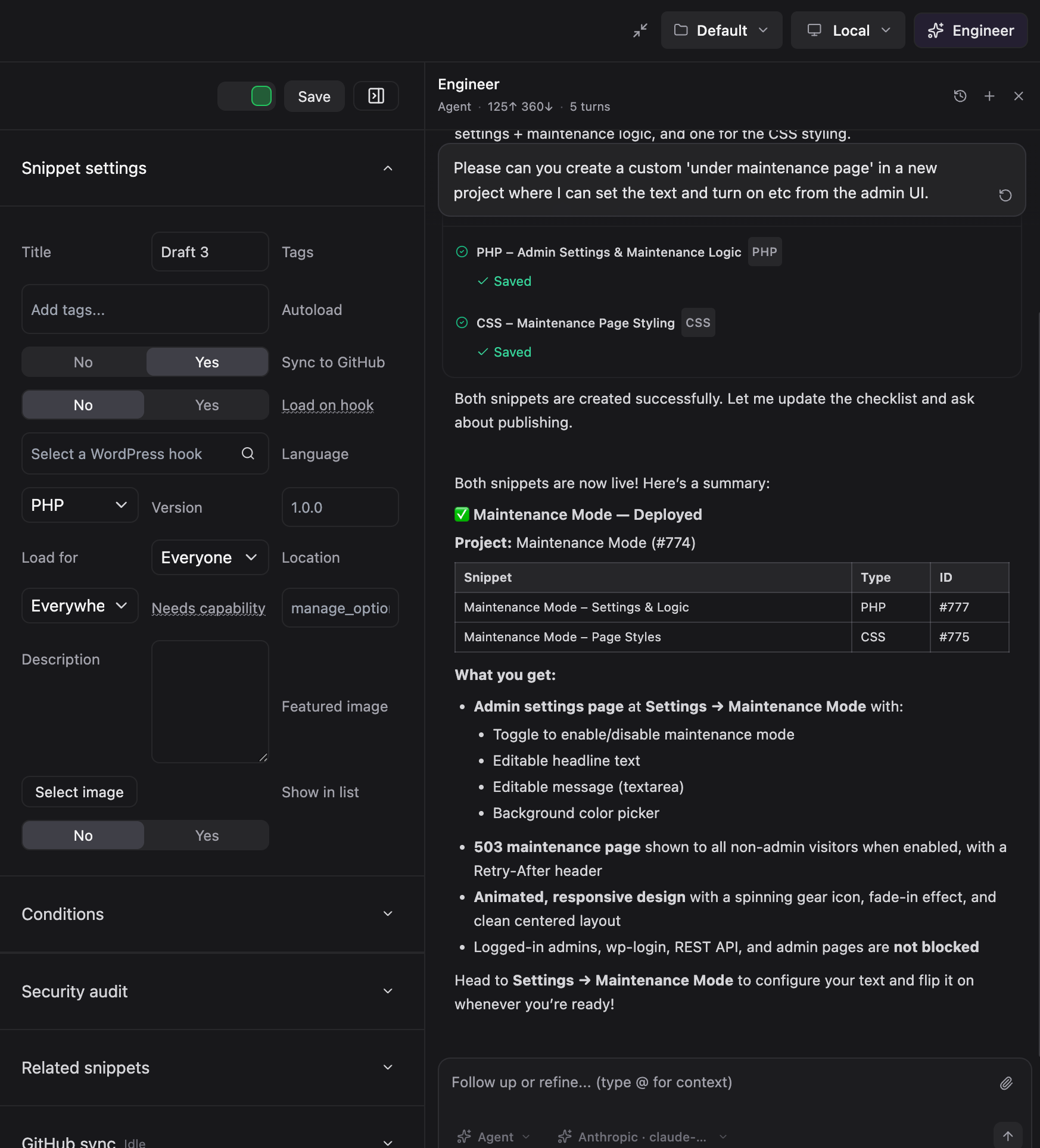
For larger requests, the agent splits work across parallel subagents. Need a custom admin page with a PHP handler, a CSS stylesheet, and a JavaScript module? The agent fans out 2–4 focused code-generation jobs that run simultaneously, each saving its output as a separate snippet the moment it finishes. The orchestrator plans and dispatches while the subagents generate — files are written and saved in parallel, not sequentially.
A live activity card shows each subagent's status, language, and a code preview as it works, with per-file "Saved" confirmation once persisted.
You stay in control
Every deploy goes through server-enforced publish gates: the sandbox must pass against the current code, and the security audit risk score must fall within your configured ceiling. Deploy approval is always human-in-the-loop by default, with an optional autopilot mode for lower-risk work. Signed deploy tokens and a full audit log track every write, deploy, rollback, and filesystem action.
The agent can also pause to ask you questions mid-run — clarifying requirements, confirming a plan before execution (Plan mode), or checking whether to publish drafts. Keyboard shortcuts (1–9) make answering quick.
A Cursor-style interface
The Snippet Engineer lives in a unified side panel accessible from anywhere in SnipVault. Four modes cover different workflows: Agent for autonomous multi-step builds, Chat for conversational help, Ask for quick questions about your codebase, and Plan for reviewing a proposed approach before the agent executes.
The composer supports @-mention autocomplete for snippets, projects, hooks, and plugins, so you can point the agent at exactly the right context. Conversations persist across sessions, and you can pick up where you left off or start fresh.
A model picker lets you choose between configured AI providers (Anthropic, OpenAI, xAI, Gemini) right from the composer — switch models mid-conversation if you want.
Built for performance
Real token-by-token streaming across all providers means you see the agent's thinking and code as it's generated — no more staring at a spinner for 30 seconds. Prompt caching keeps costs down on multi-turn runs. Incremental edits via apply_snippet_edits send only changed hunks instead of rewriting entire files. And detailed per-run performance traces give you full visibility into provider latency, tool durations, and token usage.
Project Workspaces
As your snippet library grows, folders alone aren't enough. SnipVault 1.3.0 introduces Projects — a new organizational layer that groups related snippets and folders into self-contained workspaces.
A global project switcher in the top toolbar lets you move between projects instantly. Each project gets its own folder tree, its own snippet list, and its own URL namespace (#/projects/{id}/snippets/{snippet-id}). A dedicated Projects page provides a grid view for creating, editing, duplicating, and deleting projects.
On upgrade, your existing snippets and folders are automatically migrated into a Default project — nothing breaks, nothing moves unexpectedly.
The Snippet Engineer is fully project-aware. It receives the active project's context, folder tree, and structure in its system prompt, and has tools to create projects, create folders, move snippets, and organize multi-file builds into logical groupings. Ask it to "set up a WooCommerce customization project with separate snippets for pricing, cart, and email templates" and it'll scaffold the entire workspace.
Security & reliability improvements
Several fixes tighten the agent's security posture and improve reliability on shared hosting:
Folder and batch deploys now enforce the same audit, risk ceiling, and sandbox checks per snippet that single deploys require — no more bypassing gates through batch operations.
Agent filesystem reads are restricted to
wp-content/themesandwp-content/plugins, with a path traversal fix in the sanitization layer.Agent trace files are protected with
.htaccessdeny rules, filesystem paths are stripped from API responses, and trace reads are scoped to the run owner.The agent chat custom post type is hidden from the core REST API — only SnipVault's custom routes can access it.
The publish prompt no longer hangs on shared hosting. Pause state is checkpointed before waiting for input, expired run IDs are recreated on resume, and stale session locks are cleared after proxy timeouts.
Dashboard CPU telemetry gracefully skips
/procand/syswhenopen_basedirblocks them, instead of flooding PHP error logs.
Additional improvements
Image attachments in agent chat — attach images from the composer, upload to the media library, and send to vision-capable models with thumbnail previews and chat history replay.
Incremental snippet edits — the new
apply_snippet_editstool sends only changed hunks via search/replace, so small fixes don't require rewriting the entire file.Batch deploy —
request_deploy_batchpublishes multiple snippets in one call;request_folder_deploysupports project-level deploys.Live code streaming — agent-written code types into the editor progressively as it's generated, with reduced-motion support.
Task checklists — the agent creates and updates a visible task list for complex multi-step work, with live progress tracking synced to tool execution.
Provider compatibility — transparent handling of
max_tokensvsmax_completion_tokensfor newer OpenAI models, and automatictemperatureparameter stripping for models that deprecate it.HTML snippet fix — snippets saved with the wrong
.phpextension now correctly use.html, matching GitHub sync and export naming.AI settings UX — provider cards group API keys with their models, one-click recommended model setup, and a new Remove button for disconnecting providers.